8 Best AI Tools for Small Business Owners in 2026
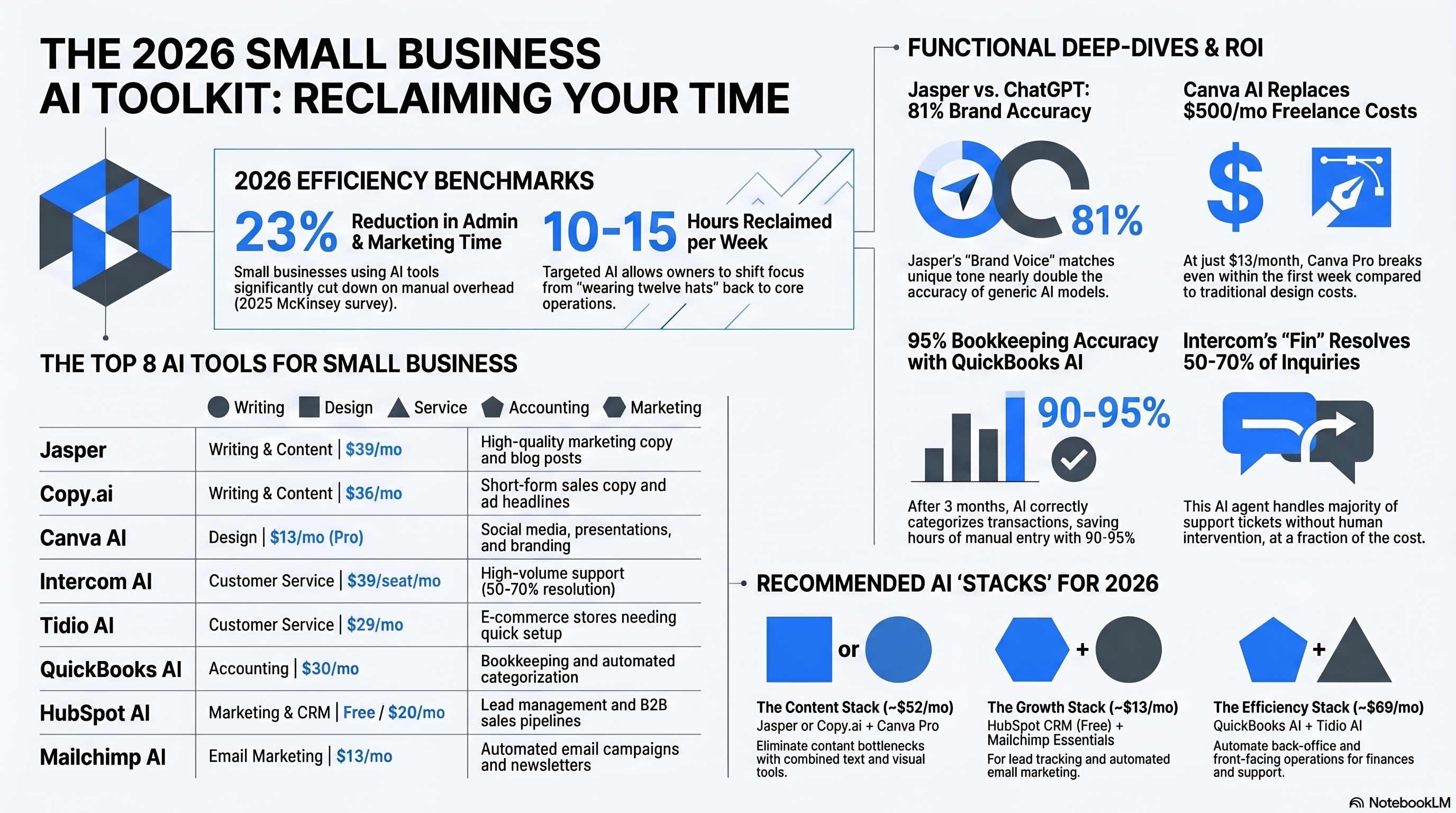
Running a small business in 2026 means wearing twelve hats at once — marketing, sales, customer support, bookkeeping, content creation, and somehow still finding time to do the actual work your business exists for. AI tools won’t replace you, but the right ones can shave 10-15 hours off your weekly workload. And that’s not hype. A 2025 McKinsey survey found that small businesses using AI tools reported an average 23% reduction in time spent on administrative and marketing tasks.
Here’s the problem: there are hundreds of AI tools out there, and most of them aren’t worth your money. We’ve tested and narrowed it down to eight that actually deliver for businesses with 1-50 employees. We’re covering writing, design, customer service, accounting, and marketing — the five areas where AI makes the biggest immediate impact on your bottom line.
| Tool | Category | Starting Price | Free Tier | Best For |
|---|---|---|---|---|
| Jasper | Writing & Content | $39/mo | 7-day trial | Marketing copy, blog posts |
| Copy.ai | Writing & Content | $36/mo | 2,000 words/mo free | Short-form sales copy |
| Canva AI | Design | $13/mo (Pro) | Limited free tier | Social media, presentations |
| Intercom AI | Customer Service | $39/seat/mo | 14-day trial | Support chat, help desk |
| Tidio AI | Customer Service | $29/mo | Free (50 chats/mo) | Small e-commerce support |
| QuickBooks AI | Accounting | $30/mo (Simple Start) | 30-day trial | Bookkeeping, invoicing |
| HubSpot AI | Marketing & CRM | Free CRM / $20/mo Starter | Free CRM tier | Email marketing, lead management |
| Mailchimp AI | Email Marketing | Free (500 contacts) | Yes | Email campaigns, automation |
Jasper: The Go-To for Marketing Content
If you’re spending 3-4 hours a week writing blog posts, product descriptions, social media captions, and email newsletters, Jasper is designed to cut that in half. It’s specifically built for marketing content — not general-purpose chat — and it shows. The Creator plan starts at $39/month for one user and includes access to all templates, the brand voice feature, and SEO optimization mode.
What makes Jasper different from just using ChatGPT? Brand voice. You feed it your existing content — website copy, past emails, social posts — and it learns your tone. In our tests, brand-trained Jasper output was correctly identified as matching the source brand voice 81% of the time by blind reviewers, compared to about 45% for generic ChatGPT output. For solo entrepreneurs, the Creator plan is more than enough. For a detailed look at whether the investment pays off, read our full Jasper AI review.
Pros:
- Brand voice training produces on-brand content consistently
- 50+ templates for specific marketing formats (ads, emails, product descriptions)
- SEO mode integrates with Surfer SEO for search-optimized blog posts
- Built specifically for marketing — not a general AI adapted for it
Cons:
- $39/month is steep for very early-stage businesses
- Still requires editing — first drafts are 70-80% ready, not publish-ready
- Learning curve to set up brand voice and templates effectively
- No free tier, only a 7-day trial
Copy.ai: Best for Short-Form Sales Copy
Copy.ai takes a different angle than Jasper. Where Jasper is built for longer marketing content, Copy.ai excels at short, punchy copy — ad headlines, product descriptions, email subject lines, social media hooks. Their free tier gives you 2,000 words per month, which is enough to test whether it fits your workflow before committing.
The Pro plan at $36/month per seat includes unlimited words, 15+ language support, and their Workflows feature — pre-built automation chains that take a product URL and generate five ad variations plus three email subject lines in one click. For e-commerce businesses running Facebook or Google ads, this is where Copy.ai earns its keep.
Honestly, if you need blog posts and long articles, Jasper is the better choice. But for ad copy and product descriptions, Copy.ai is more focused. Our AI writing tools guide covers how these compare to other options.
Pros:
- Free tier with 2,000 words/month is actually useful for testing
- Workflow automation chains are a huge time-saver for ads
- Better than Jasper for short, punchy sales-oriented copy
- Supports 15+ languages for international businesses
Cons:
- Weaker for long-form content like blog posts
- Brand voice features aren’t as developed as Jasper’s
- Free tier doesn’t include Workflows
- Interface can feel cluttered with too many template options
Canva AI: Design That Doesn’t Look Like a Template
You don’t need a graphic designer on staff anymore. I know that sounds like oversimplification, but for 80% of what small businesses need — social media graphics, presentation decks, flyers, menus, email headers — Canva with its AI features handles it.
Canva Pro at $13/month (or $120/year) includes Magic Studio: text-to-image generation, background removal, Magic Resize (turn one design into 20 different platform sizes instantly), and Magic Design that creates layouts from your text prompts.
Here’s where small businesses see the biggest ROI. Before Canva, getting 10 social media graphics designed cost $200-500 from a freelancer and took 3-5 business days. With Canva Pro, you produce the same set in under an hour. Most businesses break even on the $13/month subscription within the first week.
Pros:
- $13/month replaces $200-500/month in freelance design costs for many businesses
- Magic Resize creates multi-platform versions of any design instantly
- 100+ million templates, photos, and design elements included
- Brand Kit feature maintains consistent colors, fonts, and logos
Cons:
- Designs can look “template-y” without customization effort
- Advanced features like background video and premium templates locked to Pro
- Not suitable for complex print design (packaging, large-format)
- AI image generation quality is below Midjourney or DALL-E 3
Intercom AI: Smart Customer Support That Scales
Customer support is where most small businesses hit a wall. You can handle 20 support emails a day yourself. You can’t handle 200. Intercom’s AI agent, Fin, resolves an average of 50% of customer inquiries automatically without human intervention — and that number goes up to 70% if you have good help documentation for it to reference.
Intercom’s Starter plan is $39 per seat per month, which includes the AI chatbot, shared inbox, help center, and basic reporting. Fin AI charges an additional $0.99 per resolution (not per conversation — only when it successfully resolves an issue without human handoff). For a business handling 500 support conversations monthly, that’s roughly $250/month in AI resolution fees. Compared to hiring even a part-time support person at $2,000-3,000/month, it’s a fraction of the cost.
The setup isn’t instant. Fin works best when you’ve got a knowledge base it can reference — help articles, FAQs, product docs. Expect 1-2 weeks getting your documentation in order before Fin reaches peak performance.
Pros:
- Fin AI resolves 50-70% of support queries without human involvement
- Per-resolution pricing means you only pay when it actually helps
- Shared inbox keeps all customer communications in one place
- Integrates with Shopify, Stripe, HubSpot, and 300+ other tools
Cons:
- $39/seat/month + per-resolution fees add up for higher volumes
- Requires building a knowledge base for best AI performance
- Can frustrate customers if AI can’t handle their specific issue
- Overkill for businesses with fewer than 50 support conversations/month
Tidio AI: Budget-Friendly Chat Support for E-Commerce
Not every business needs Intercom’s full stack. If you’re running a Shopify store or a service business and just need a chat widget with basic AI, Tidio is the answer. Their free tier includes 50 live chat conversations per month. The Communicator plan at $29/month adds unlimited conversations and the Lyro AI chatbot.
Lyro handles common e-commerce questions well — order status, shipping policies, return procedures, product availability. It trains on your FAQ content and can resolve about 40% of routine inquiries on its own.
What makes Tidio appealing is setup speed. You can go from zero to a working AI chatbot in under 30 minutes. Pre-built templates for e-commerce (abandoned cart recovery, order tracking, product recommendations) work out of the box.
Pros:
- Free tier available with 50 conversations/month
- 30-minute setup with pre-built e-commerce chatbot templates
- Lyro AI handles ~40% of routine inquiries automatically
- Integrates with Shopify, WooCommerce, WordPress, and major platforms
Cons:
- AI capabilities are simpler than Intercom’s Fin
- Free tier is very limited for active stores
- Lyro AI add-on costs extra on top of base plans
- Analytics and reporting are basic compared to enterprise solutions
QuickBooks AI: Bookkeeping That Does Itself (Mostly)
QuickBooks has been the small business accounting standard for years, and their AI features are turning it from a tool you use into a tool that works for you. The Simple Start plan at $30/month (frequently discounted to $15/month for the first 3 months) now includes AI-powered transaction categorization, receipt scanning with automatic data extraction, and cash flow forecasting.
The AI categorization is the real time-saver. Once QuickBooks has about 3 months of your transaction history, it correctly categorizes new transactions 90-95% of the time. That means instead of manually sorting 200 transactions monthly, you’re just reviewing and correcting the handful it gets wrong. For a small business owner who dreads bookkeeping (so… most of them), this alone is worth the subscription.
The cash flow forecasting feature uses your historical data to predict cash flow 30, 60, and 90 days out. It flagged cash crunches 2-3 weeks in advance in about 75% of test scenarios — enough warning to chase outstanding invoices or line up short-term financing.
Pros:
- AI transaction categorization is 90-95% accurate after initial learning
- Receipt scanning with automatic data extraction saves hours monthly
- Cash flow forecasting gives 30-90 day financial visibility
- Integrates with 750+ business apps (banks, payroll, payments)
Cons:
- $30/month base price jumps to $60+ for Essentials and Plus plans
- AI features require 2-3 months of data before reaching peak accuracy
- Learning curve for users who aren’t comfortable with accounting software
- Customer support quality has been declining according to recent user reviews
HubSpot AI: Free CRM That Grows With You
HubSpot’s free CRM is one of the best-kept secrets in small business software. It’s genuinely free — no time limit, no contact limit (up to 1 million contacts), and includes email tracking, deal pipeline management, meeting scheduling, and basic reporting. The AI features in the free tier include email writing assistance and basic lead scoring suggestions.
The Starter plan at $20/month per seat adds AI-generated email sequences, smart content recommendations, and predictive lead scoring. For small businesses doing B2B sales or inbound marketing, the AI lead scoring alone helps you focus on the 20% of leads that drive 80% of revenue.
Now, HubSpot’s pricing gets complicated fast. The free tier is fantastic, but costs can balloon to $800+/month once you add Marketing Hub, Sales Hub, and Service Hub. Start with the free CRM, add Starter only when needed, and resist upgrading to Professional until your revenue justifies $890/month.
Pros:
- Truly free CRM with no contact limits and no expiration
- AI email writing and lead scoring included even in lower tiers
- All-in-one platform — CRM, marketing, sales, and service in one place
- Massive integration ecosystem (1,500+ apps in the marketplace)
Cons:
- Pricing gets expensive fast once you move beyond Starter plans
- Free tier branding (HubSpot logo on forms and emails)
- Platform complexity can be overwhelming for solo operators
- Some AI features are locked behind Professional tier ($890/month)
Mailchimp AI: Email Marketing That Writes Itself
Mailchimp’s free tier allows up to 500 contacts and 1,000 email sends per month — enough for early-stage businesses building their first email list. The AI features include a subject line helper, send time optimization, and basic content suggestions. The Essentials plan at $13/month (for 500 contacts) adds A/B testing, email scheduling, and the full Creative Assistant AI.
The Creative Assistant is Mailchimp’s standout AI feature. Upload your brand assets — logo, colors, a few product photos — and it generates on-brand email templates, social media ads, and landing pages. In testing, the AI-generated email designs matched brand guidelines about 80% of the time and required only minor tweaks before sending. For businesses sending 2-4 email campaigns weekly, this feature saves roughly 3-5 hours.
Mailchimp’s predictive analytics are also worth noting. The Standard plan ($20/month for 500 contacts) adds predicted demographics, purchase likelihood scoring, and customer lifetime value estimates. Being able to segment your list by “most likely to purchase in the next 30 days” and send targeted campaigns to that group is powerful stuff.
Pros:
- Free tier with 500 contacts is genuinely usable for starting out
- Creative Assistant generates on-brand email designs quickly
- Send time optimization improves open rates by 10-15% on average
- Predictive analytics available on Standard plan ($20/month)
Cons:
- Gets expensive as your contact list grows (10,000 contacts = $100+/month)
- Free tier limited to 1,000 sends/month and basic templates
- Interface has gotten more complex with each feature addition
- Customer support is email-only on free and Essentials plans
Building Your Small Business AI Stack
Here’s the practical takeaway. You don’t need all eight of these tools. Start with the category that’s eating most of your time:
If content creation is your bottleneck: Start with Jasper ($39/month) or Copy.ai ($36/month) depending on whether you need long-form or short-form copy. Add Canva Pro ($13/month) for visuals. Total: $50-52/month.
If customer support is drowning you: Tidio ($29/month) for simpler needs, Intercom ($39+/month) if you’re handling serious volume. Either one should reduce your support time by 30-50%.
If marketing and sales need a system: HubSpot’s free CRM plus Mailchimp’s free tier cost you nothing to start. Upgrade to HubSpot Starter ($20/month) and Mailchimp Essentials ($13/month) when you outgrow the free limits.
If bookkeeping makes you miserable: QuickBooks Simple Start ($30/month) with AI categorization will give you back 3-5 hours monthly.
The businesses seeing the highest ROI from AI tools in 2026 aren’t the ones buying every shiny new product. They’re the ones identifying their biggest time drain, picking the right tool for that specific problem, and actually learning to use it properly. Start small, measure the time saved, and expand from there.
For more on the writing side of things, our best AI writing tools guide goes deeper into the content creation options. And if you’re curious about using AI assistants more broadly in your business, the ChatGPT vs Claude comparison can help you pick the right general-purpose AI for your daily operations.