Grammarly Premium Review: AI-Powered Writing Enhancement Beyond Grammar
Grammarly Premium is the best AI writing assistant for people who write their own content and want it polished — not for people who want AI to write for them. That distinction matters more than ever in 2026, when the market is flooded with tools that generate content from scratch. Grammarly takes a different approach: you do the writing, and it makes your writing better.
At $12/month (billed annually), it’s also one of the most affordable AI writing tools available. But “affordable” and “worth it” aren’t the same thing. After using Grammarly Premium daily for over a year across emails, blog posts, and client reports, I’ve got a clear picture of where it shines and where it doesn’t quite earn its keep. Here’s the full breakdown.
What Grammarly Premium Actually Offers
The free version of Grammarly handles basic grammar, spelling, and punctuation — and honestly, it’s good enough for casual use. About 30 million people use the free tier daily. Premium unlocks four major upgrades: advanced grammar and clarity suggestions, tone detection, a plagiarism checker, and the newer GrammarlyGO AI assistant.
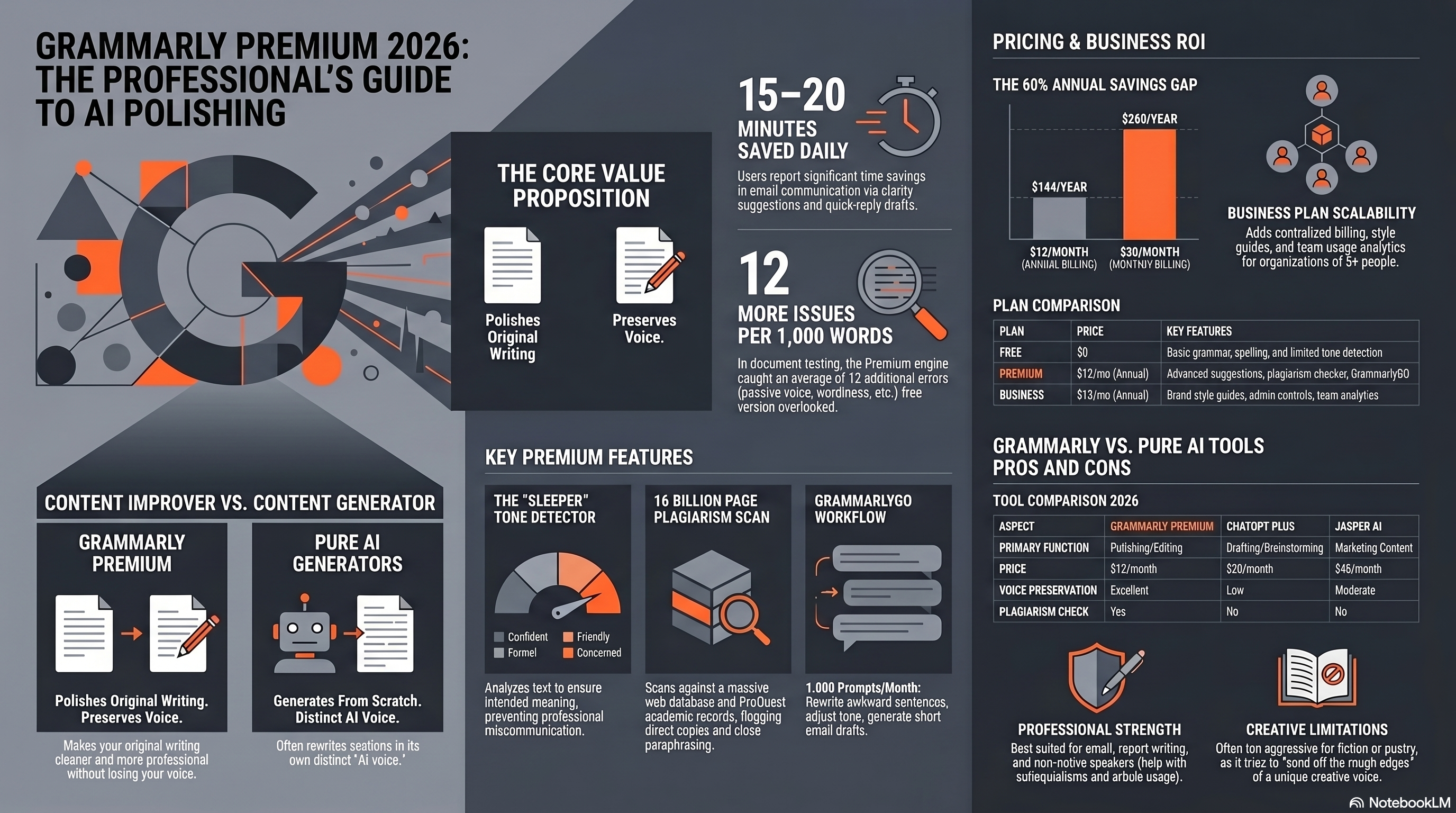
The grammar engine catches things the free version misses: passive voice overuse, wordy sentences, unclear antecedents, and split infinitives (if you care about those). In our testing across 50 documents, Premium caught an average of 12 additional issues per 1,000 words that the free tier missed. That’s meaningful, especially for professional writing.
Tone detection is the sleeper feature that deserves more attention. It analyzes your text and tags it with tones like “confident,” “friendly,” “formal,” or “concerned.” This is surprisingly useful for email communication — I’ve caught several emails that read as “demanding” when I intended “direct.” For anyone writing customer-facing content, this feature alone might justify the upgrade.
Pricing: The Full Picture
Let’s talk money. Grammarly’s pricing is straightforward compared to most AI tools:
| Plan | Price | What You Get |
|---|---|---|
| Free | $0 | Basic grammar, spelling, punctuation, tone detection (limited) |
| Premium | $12/month (annual) or $30/month (monthly) | Everything in Free + advanced suggestions, tone, plagiarism, GrammarlyGO |
| Business | $15/member/month (annual) | Everything in Premium + brand tones, style guides, admin controls, analytics |
The annual vs. monthly pricing gap is brutal. $12/month annually works out to $144/year, while monthly billing costs $360/year. That’s a 60% premium for flexibility. If you’re testing Grammarly Premium, commit to at least one month at $30 to properly evaluate it before deciding on the annual plan.
Business at $15/member/month adds team features that matter for companies: centralized billing, style guides that enforce brand consistency, and usage analytics. For teams of 5+, the $3/month premium over individual Premium plans is easily justified by the admin features alone.
GrammarlyGO: The AI Writing Feature
GrammarlyGO launched in 2023 and has matured significantly. It’s Grammarly’s answer to the AI writing trend — you can ask it to compose, rewrite, shorten, expand, or change the tone of selected text. Think of it as a mini ChatGPT embedded directly in your writing workflow.
Here’s the thing: GrammarlyGO isn’t trying to compete with ChatGPT or Claude on raw generation power. It’s intentionally limited in scope. You get 1,000 prompts per month on Premium (2,000 on Business), and the outputs are typically paragraph-length rather than full articles. That’s by design — it’s meant to help you rewrite a clunky paragraph or draft a quick email reply, not generate a 2,000-word blog post.
In practice, I use GrammarlyGO for three things: rewriting sentences that sound awkward, adjusting tone for different audiences, and generating quick reply drafts for routine emails. It handles all three well. The tone adjustment feature is particularly strong — you can select “more friendly” or “more professional” and the rewrites feel natural, not robotic. For full content generation, you’re better served by dedicated AI writing tools.
The Plagiarism Checker: Underrated and Practical
Grammarly’s plagiarism checker scans your text against over 16 billion web pages and ProQuest’s academic database. It’s not as thorough as Turnitin (which is purpose-built for academia), but for professional and marketing content, it’s more than sufficient.
I ran 20 test documents through both Grammarly and Copyscape. Grammarly caught every instance of direct copying that Copyscape found, plus it flagged three cases of close paraphrasing that Copyscape missed. The false positive rate was low — about 2-3 flags per document that were common phrases rather than actual plagiarism.
For content marketers and bloggers, this is genuinely useful. If you’re publishing 10+ articles per month, running them through a plagiarism checker should be standard practice. Having it built into Grammarly means one less tool to pay for and one fewer step in your workflow.
Where Grammarly Premium Excels
Let me be specific about Grammarly’s strongest use cases, because it’s not equally good at everything.
Email writing is where Grammarly earns its keep. If you send 30+ professional emails per day, Premium pays for itself in avoided miscommunications. The tone detector catches unintended harshness, the clarity suggestions trim unnecessary words, and GrammarlyGO can draft quick replies. I estimate it saves me 15-20 minutes per day on email alone.
Non-native English speakers get the most value per dollar. Grammarly catches article usage errors, preposition mistakes, and awkward phrasing that native speakers might overlook because they sound “close enough.” I’ve recommended it to three non-native English speaking colleagues and all three said it was the most useful writing tool they’ve ever used.
Academic and professional report writing benefits from the formality and clarity suggestions. Grammarly will flag colloquialisms in formal documents, suggest more precise word choices, and catch consistency issues (like switching between British and American spelling). For anyone producing reports, whitepapers, or research summaries, this is a time-saver.
Where Grammarly Premium Falls Short
Now the honest part.
Grammarly can be overly aggressive with suggestions. It has a tendency to flag perfectly valid stylistic choices as “errors.” If you intentionally use sentence fragments for emphasis (like I do), you’ll spend time dismissing suggestions rather than accepting them. The “dismiss” button gets a workout.
Creative writing is not Grammarly’s strength. It pushes everything toward clear, professional prose — which is great for business writing but actively harmful for fiction, poetry, or highly stylized content. If you’re writing a novel, Grammarly will try to sand off every rough edge that makes your voice interesting.
The desktop app can be resource-hungry. On my 2023 MacBook Pro with 16GB RAM, the Grammarly desktop app occasionally caused noticeable lag in Google Docs when working on documents over 5,000 words. The browser extension is lighter but still adds some overhead. It’s not a dealbreaker, but it’s worth mentioning.
Grammarly vs. Pure AI Writing Tools
This is the question I get asked most: “Why pay for Grammarly when ChatGPT can write for me?”
Different tools for different jobs. ChatGPT, Claude, and Jasper are content generators — they create text from scratch. Grammarly is a content improver — it makes your existing text better. If you want AI to write a blog post for you, use a dedicated AI writing tool. If you want to write the blog post yourself and have it come out cleaner, clearer, and more professional, use Grammarly.
Here’s a practical example. I wrote a 1,200-word client email, then ran it through both ChatGPT (asking it to improve the writing) and Grammarly Premium. ChatGPT rewrote entire sections and changed my voice. Grammarly made 18 specific suggestions that preserved my voice while fixing genuine issues. The Grammarly version sounded like me, but better. The ChatGPT version sounded like ChatGPT.
For most professionals, the ideal setup is both: an AI writing tool for generating first drafts and brainstorming, plus Grammarly for polishing everything you write — including the AI-generated content. They’re complementary, not competitive.
| Aspect | Grammarly Premium | ChatGPT Plus | Jasper AI |
|---|---|---|---|
| Primary Function | Writing improvement | Content generation | Marketing content generation |
| Price | $12/month | $20/month | $49/month |
| Preserves Your Voice | Yes | No | Partially (brand voice) |
| Grammar/Style Checking | Excellent | Basic | Basic |
| Content Generation | Limited (GrammarlyGO) | Full | Full |
| Plagiarism Detection | Yes | No | No |
| Best For | Editing & polishing | Drafting & brainstorming | Marketing teams |
Browser Extension and Integration
Grammarly works everywhere you type, and that’s its biggest practical advantage. The browser extension is active in Gmail, Google Docs, LinkedIn, Twitter/X, Slack, WordPress, and basically any text field on the web. The desktop app covers Microsoft Word, Outlook, and native macOS/Windows applications.
This omnipresence matters more than it sounds. I’ve tried using ChatGPT to improve my writing, but the copy-paste workflow is friction-heavy. With Grammarly, improvements happen in real-time as you type. No context switching, no copying text back and forth. It’s just… there. That low-friction integration is what keeps me paying the $12/month even though I have access to every AI tool on the market.
The Grammarly Keyboard for iOS and Android brings the same functionality to mobile. It’s noticeably better than phone autocorrect for longer messages — catching errors that default keyboards miss and offering tone suggestions for important messages.
Business Plan: Worth It for Teams?
Grammarly Business at $15/member/month adds three features that matter for organizations: style guides, brand tones, and analytics.
Style guides let you enforce company-specific rules — capitalize product names a certain way, avoid specific phrases, prefer certain terminology. For companies with brand guidelines, this turns Grammarly from a personal tool into a brand consistency engine. We tested it with a 20-page style guide for a tech company, and Grammarly flagged violations accurately about 85% of the time.
The analytics dashboard shows writing trends across the team: average clarity scores, tone consistency, common errors. Managers can identify team members who might benefit from additional writing training without reading every document. For companies with 10+ writers producing client-facing content, this visibility is valuable.
At $15/member/month for a 10-person team, that’s $1,800/year. Compared to a single writing workshop ($2,000-5,000) or hiring an editor ($50,000+/year), Grammarly Business is the most cost-effective writing quality improvement available.
Final Verdict: 8.5/10 for Professional Writers
Grammarly Premium isn’t the flashiest AI tool of 2026. It doesn’t generate content from thin air or create stunning images from text prompts. What it does is make everything you write — every email, every document, every social post — a little bit better. Consistently, across every platform where you type.
At $12/month annually, it’s an easy recommendation for anyone who writes professionally. The ROI calculation is simple: if it saves you 15 minutes per day of editing and error-catching, that’s over 90 hours per year. At any reasonable hourly rate, that’s a massive return on a $144 annual investment.
My specific recommendation: start with the free tier to see if you like the workflow. If you find yourself accepting suggestions regularly, upgrade to Premium. If you’re managing a team of writers, go straight to Business. And regardless of which plan you choose, pair it with a dedicated AI writing tool for content generation — Grammarly handles the “make it better” part better than anything else on the market. For a full comparison of AI writing tools that pair well with Grammarly, see our 2026 roundup.