Notion AI Review: How Good Is the Built-In AI Assistant?
Notion AI is the best workspace-integrated AI assistant available right now — but it’s not the best AI writing tool, and that distinction matters. If you’re already a Notion user managing your team’s docs, wikis, and projects inside the platform, the $10/member/month add-on is a no-brainer. If you’re considering switching to Notion specifically for the AI features, hold on. The AI is good, not transformative.
I’ve been running Notion AI across a 15-person team for six months. We use Notion as our primary knowledge base, meeting notes repository, and project tracker. The AI add-on has become one of those tools that’s quietly useful every day without being something you’d rave about at dinner. It saves time in small increments that add up. Here’s exactly where it delivers and where it disappoints.
What Notion AI Actually Does
Notion AI is an embedded assistant that works directly inside your Notion pages. You can invoke it by typing ”/” and selecting an AI option, pressing a keyboard shortcut, or highlighting text and choosing an AI action. It doesn’t live in a separate window or require context switching — it’s just part of Notion.
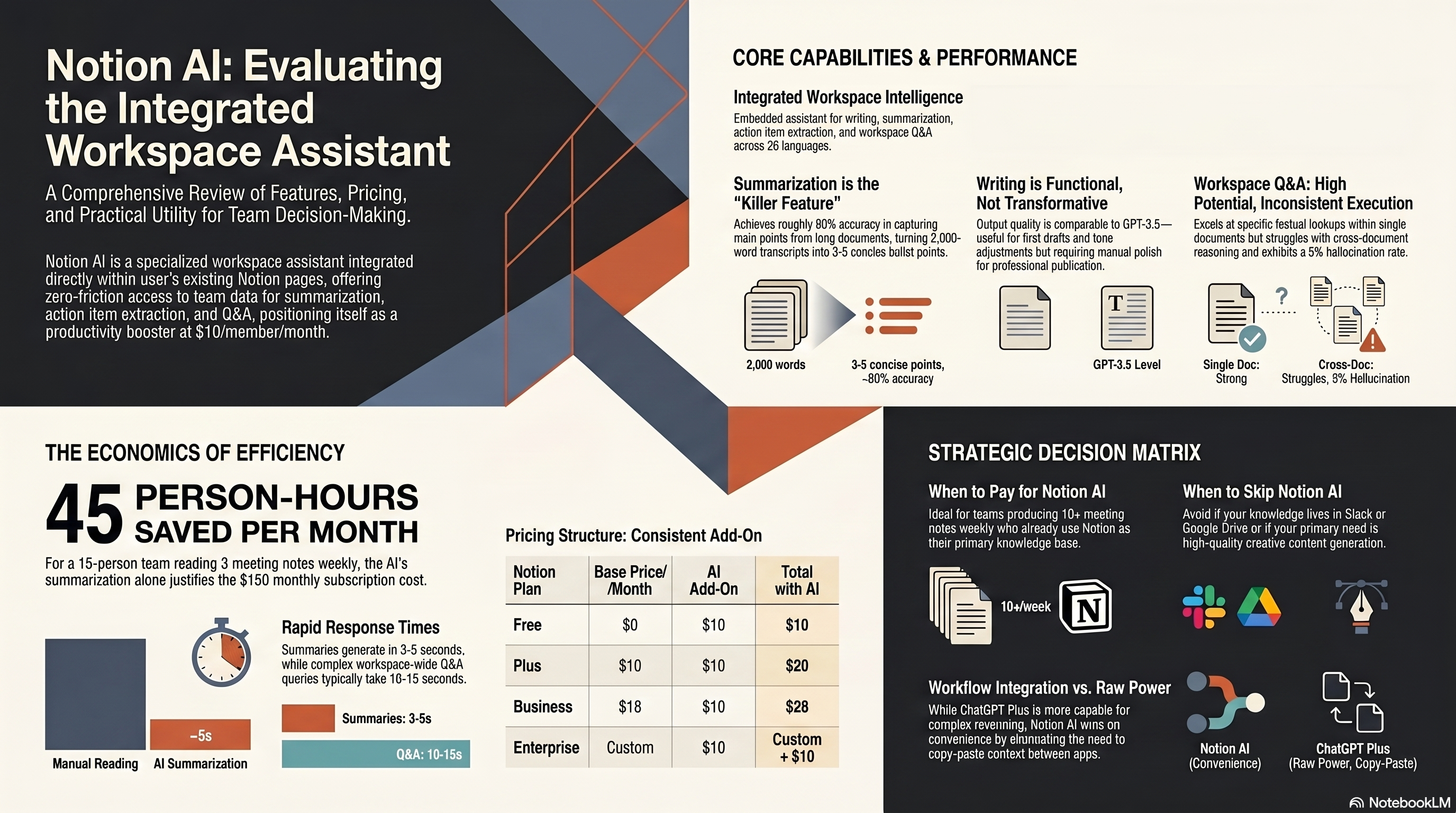
The core capabilities break down into five categories: writing assistance (drafting, editing, tone changes), summarization (condense long docs into key points), action items extraction (pull tasks from meeting notes), Q&A (ask questions about your workspace content), and translation (26 languages supported). Each works on the content already in your Notion workspace, which gives it a contextual advantage that standalone AI tools can’t match.
Here’s what makes this different from using ChatGPT or Claude alongside your docs: Notion AI already knows your content. You don’t need to copy-paste a 3,000-word meeting transcript into a chat window. You just click “Summarize” on the page and get a condensed version in seconds. That zero-friction access to your existing data is Notion AI’s genuine competitive advantage.
Pricing: The Add-On Model
Notion AI isn’t included in any Notion plan by default. It’s a separate add-on:
| Notion Plan | Base Price | AI Add-On | Total with AI |
|---|---|---|---|
| Free | $0 | $10/member/month | $10/member/month |
| Plus | $10/member/month | $10/member/month | $20/member/month |
| Business | $18/member/month | $10/member/month | $28/member/month |
| Enterprise | Custom | $10/member/month | Custom + $10 |
The $10/member/month pricing is flat regardless of which Notion plan you’re on. For a 15-person team like ours on the Business plan, that’s an extra $150/month — $1,800/year. That’s not trivial, and you need to be honest about whether the team will actually use it enough to justify the cost.
Notion does offer a limited free trial — you get about 20 AI responses for free to test the feature before committing. I’d strongly recommend maxing out those trial responses on real work tasks, not toy examples. Use it on an actual meeting transcript, a real project doc, and a genuine email draft. That’s the only way to gauge whether it’ll stick in your workflow.
Writing Assistance: Solid But Not Spectacular
Notion AI’s writing capabilities cover the basics well. You can ask it to draft blog posts, emails, social media content, project briefs, and meeting agendas directly inside a Notion page. The output quality is roughly on par with ChatGPT 3.5 — usable for first drafts but not polished enough for direct publication.
Where it gets interesting is the contextual writing. If you’re working in a project page that has specs, timelines, and team member information, Notion AI can reference that context when generating content. Ask it to “write a project update email based on this page” and it actually pulls in the relevant details. That’s something you can’t easily do with a standalone AI writing tool without manually feeding it context.
The editing features — improve writing, fix grammar, make shorter, make longer, change tone — work well for quick adjustments. I use “make shorter” constantly for trimming wordy meeting notes. “Change tone to professional” is useful for turning casual internal notes into client-facing documents. These aren’t unique features, but having them one click away inside your existing workspace is genuinely convenient.
Alright, now for the honest part. For serious content creation — blog posts, marketing copy, detailed reports — Notion AI doesn’t compete with dedicated tools like Jasper or even ChatGPT Plus. The output tends to be generic and surface-level. If content creation is your primary need, you’ll want a specialized tool and then paste the results into Notion.
Summarization: The Killer Feature
This is where Notion AI truly earns its price tag. Summarization is the feature our team uses most, and it’s genuinely excellent.
We dump meeting notes, client call transcripts, and research documents into Notion regularly. Before Notion AI, nobody read the 2,000-word meeting notes. They’d skim the first paragraph and miss critical decisions buried on page three. Now, every lengthy document gets an AI-generated summary at the top — usually 3-5 bullet points capturing the key decisions, action items, and deadlines.
The accuracy is impressive. Across 100 summarized documents, I spot-checked 30 and found the summaries accurately captured the main points about 90% of the time. The remaining 10% were cases where the AI missed nuance or over-simplified a complex technical discussion. But for getting the gist of a long document in 15 seconds? It’s excellent.
One workflow we’ve adopted: every meeting note template now has a “Summary” section at the top. After the note-taker finishes, they hit the AI summarize button and paste the result into that section. It takes 10 seconds and saves every reader 5-10 minutes. Across a 15-person team reading an average of 3 meeting notes per week, that’s roughly 45 person-hours saved per month. That alone covers the $150/month cost.
Action Items and Task Extraction
Notion AI can scan a document and extract action items — tasks, deadlines, owners. For meeting notes, this is a practical time-saver. Instead of manually reviewing notes to create follow-up tasks, you ask the AI and it pulls them out.
The accuracy depends heavily on how structured your notes are. If your meeting notes clearly state “Jeff will send the proposal by Friday,” the AI catches it every time. If the action item is implicit — like “we should probably follow up on that pricing discussion” — it misses about 40% of the time. The lesson: write clearer meeting notes, and the AI extraction works better.
We’ve connected this to Notion’s database features. Extracted action items can be pushed directly into a project tracker database, assigned to team members, and given due dates. It’s not fully automatic (you need to review and confirm each extracted item), but it reduces the post-meeting admin work from 15 minutes to about 3 minutes.
Workspace Q&A: Promising but Limited
The Q&A feature lets you ask questions about content across your Notion workspace. Think of it as a search engine with natural language understanding — instead of searching for keywords, you ask “What did we decide about the pricing model in last month’s strategy meeting?” and it finds the relevant information.
This is the feature with the most potential and the most frustration. When it works, it’s magical. I asked “What’s our current refund policy?” and it found the correct policy doc, pulled the relevant section, and summarized it in three sentences. No searching, no clicking through multiple pages. That experience saved me a solid five minutes.
When it doesn’t work, it’s unhelpful. Complex questions that span multiple documents often return vague or incomplete answers. “How has our product roadmap changed over the past quarter?” returned a generic response that missed several key updates documented across four different pages. The Q&A works best for specific, factual questions with answers in a single document. Cross-document reasoning is still weak.
Notion has been improving Q&A’s accuracy in recent updates, and the March 2026 update added better source attribution — it now links to the specific pages it pulled information from, which helps verify the answers. But it’s still a version 1 feature in many ways.
Integrations and Ecosystem Fit
Notion AI’s biggest advantage is that it’s not another tool — it’s inside the tool you’re already using. There’s no new app to open, no API to configure, no switching between tabs. If your team lives in Notion, the AI is just… there.
This matters more than people think. We previously tried using ChatGPT as a team AI tool, but adoption was spotty. People had to remember to open it, copy content in, and paste results back. Usage dropped off after the first month. With Notion AI, usage has stayed consistent at about 85% of team members using it weekly, because it’s embedded in their existing workflow.
That said, Notion AI is siloed within Notion. It can’t access your Slack messages, email, or other tools. If your knowledge lives across multiple platforms, Notion AI only sees the Notion portion. For teams that keep everything in Notion, this isn’t a problem. For teams with fragmented toolstacks, the AI’s context is limited.
Performance and Reliability
Response times are generally fast. Summarizations take 3-5 seconds for a typical document. Writing generations take 5-10 seconds. Q&A responses vary — simple queries return in 3 seconds, complex workspace-wide queries can take 10-15 seconds.
We’ve experienced occasional slowdowns during what appear to be peak usage times (Tuesday and Wednesday mornings, US Eastern time). The responses still come, but might take 2-3x longer. No outages or errors in our six months of use, though — reliability has been solid.
One annoyance: Notion AI occasionally generates responses that are clearly hallucinated, especially in Q&A mode. It’ll confidently state something that isn’t in your workspace, presented as if it found it in your documents. This happens maybe 5% of the time, but it means you always need to verify Q&A responses against the source material. Trust but verify.
Who Should Pay for Notion AI
Look, here’s the straightforward recommendation.
Pay for Notion AI if:
- Your team already uses Notion as its primary workspace (this is non-negotiable)
- You produce 10+ meeting notes or long documents per week
- You want to reduce the time people spend reading internal documents
- Your team has 5+ members who would benefit from summarization and Q&A
Skip Notion AI if:
- You don’t currently use Notion (don’t switch just for the AI)
- Your primary need is content generation (use dedicated AI writing tools instead)
- Your team is small (1-3 people) and doesn’t produce many internal docs
- Your knowledge lives mostly outside Notion (Slack, Google Drive, etc.)
For teams that fit the first profile, the $10/member/month add-on is one of the better-value AI subscriptions available. Not because the AI is exceptional, but because it adds genuine utility to a tool you’re already paying for and using daily.
Comparison with Standalone AI Tools
It’s worth addressing the elephant in the room: why pay $10/month for Notion AI when ChatGPT Plus costs $20/month and does more?
The answer is workflow integration. ChatGPT is more capable as a raw AI tool. It generates better content, handles more complex reasoning, and has a broader feature set. But it requires you to leave your workspace, provide context manually, and copy results back. Notion AI is less capable but more convenient. For routine tasks like summarization, tone adjustments, and quick Q&A, convenience wins.
The smartest approach isn’t choosing between them. Use Notion AI for workspace-specific tasks (summarize this doc, extract action items, answer questions about our content) and use ChatGPT or Claude for complex generation tasks (write a detailed blog post, analyze a competitive space, brainstorm campaign ideas). They’re complementary tools.
For visual content generation to embed in your Notion pages, tools like Midjourney fill a gap that Notion AI doesn’t address at all.
Final Verdict: 7.5/10 for Existing Notion Users
Notion AI is a good add-on to an already good product. It’s not going to change how you work, but it will make several daily tasks 30-50% faster. Summarization is excellent, writing assistance is adequate, Q&A is promising but inconsistent, and action item extraction is a practical time-saver.
The $10/member/month price is fair for teams that will use it regularly. The break-even calculation is simple: if each team member saves 30 minutes per week using Notion AI (which our team easily does), the time savings far exceed the cost. Just don’t expect it to replace dedicated AI writing tools for content creation — it’s a workspace assistant, not a content engine. For a broader perspective on the AI writing tools that complement Notion AI best, check out our best AI writing tools guide.